





Location Condition for Alerts: New option available in the Alerts panel
Quoi de neuf
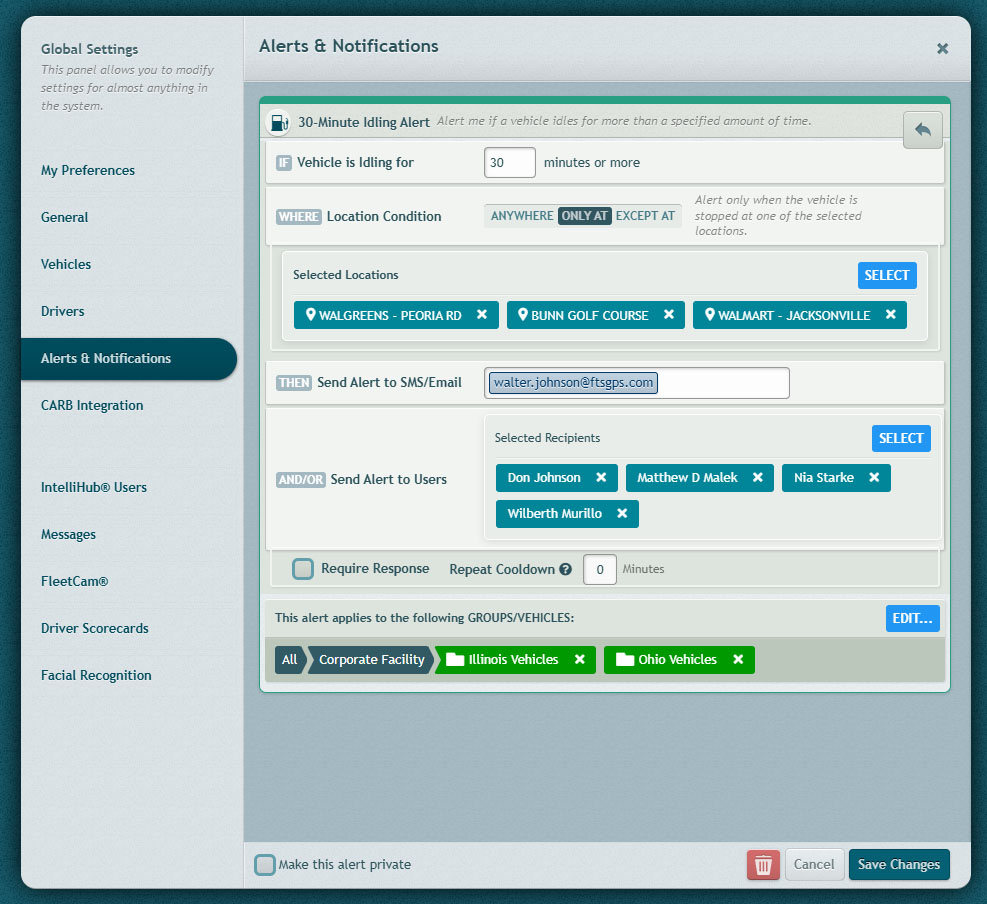
Les Location Condition option, already available for the Véhicule à l'arrêt alert, is now also available for the Idling alert.
This lets you customize your alerts further and make them more precise.
Comment ça marche
- When configuring a supported alert, users can choose whether the alert should apply everywhere or only in relation to selected locations.
- The Location Condition setting is shown directly on the alert configuration screen, making it easy to apply location rules without leaving the alert setup flow.
- • This helps reduce unnecessary alerts by limiting them to the locations that matter most for the user’s operation.
Qu'est-ce qui a changé
Selected alert types now include a Location Condition section in the Alerts panel. Users can choose from the following options:
| Option | Behavior |
|---|---|
| N'importe où | No location restriction. This is the default behavior. |
| Seulement À | The alert fires only when the vehicle is at a selected location or location group. |
| Sauf à | The alert fires unless the vehicle is at a selected location or location group. |
Exigences
- The Location Condition option is available only for alert types that support location-based filtering.
- Users must select a location or location group when using Seulement À ou Sauf à.
- No additional setup is required to use N'importe où; it remains the default option.
Besoin d'aide ?
Soumettre un numéro
Créer un ticketQuestions générales
support@ftsgps.comAppelez-nous directement
1-866-221-1864