





Location Condition for Alerts: New option available in the Alerts panel
What’s New
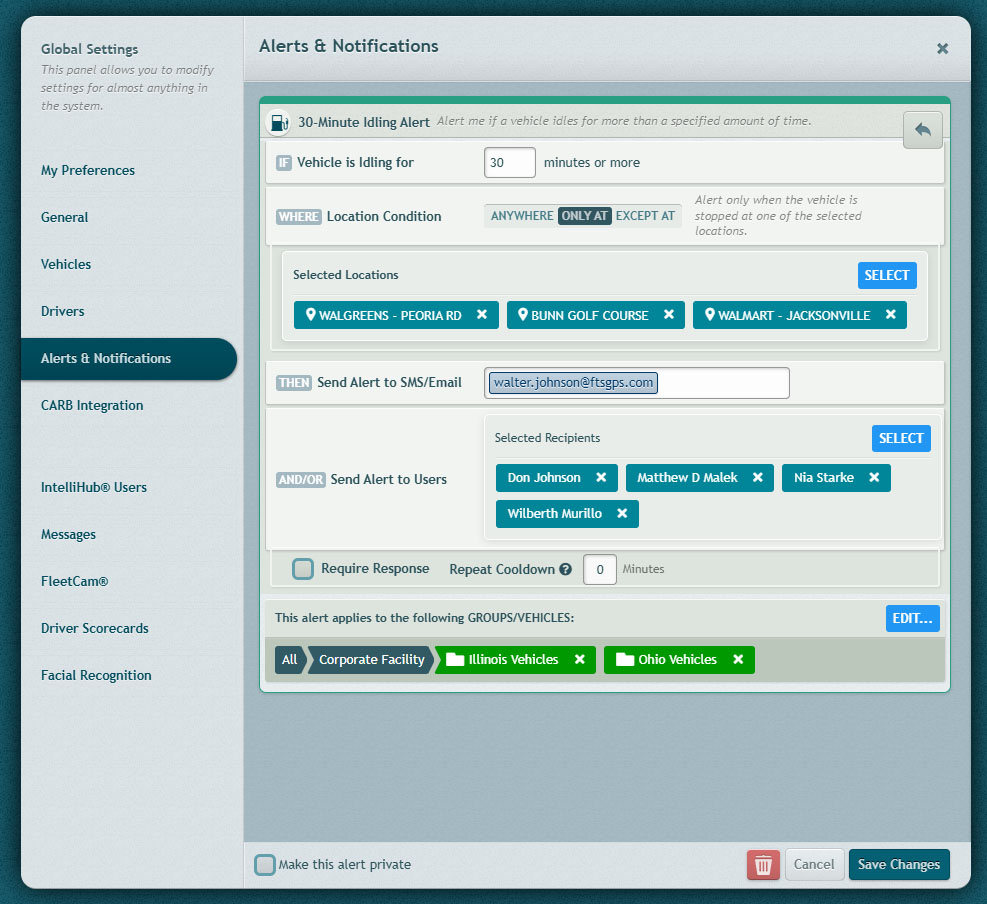
The Location Condition option, already available for the Vehicle Stopped alert, is now also available for the Idling alert.
This lets you customize your alerts further and make them more precise.
How It Works
- When configuring a supported alert, users can choose whether the alert should apply everywhere or only in relation to selected locations.
- The Location Condition setting is shown directly on the alert configuration screen, making it easy to apply location rules without leaving the alert setup flow.
- • This helps reduce unnecessary alerts by limiting them to the locations that matter most for the user’s operation.
What Changed
Selected alert types now include a Location Condition section in the Alerts panel. Users can choose from the following options:
| Option | Behavior |
|---|---|
| Anywhere | No location restriction. This is the default behavior. |
| Only At | The alert fires only when the vehicle is at a selected location or location group. |
| Except At | The alert fires unless the vehicle is at a selected location or location group. |
Requirements
- The Location Condition option is available only for alert types that support location-based filtering.
- Users must select a location or location group when using Only At or Except At.
- No additional setup is required to use Anywhere; it remains the default option.
Need more help?