





How to Edit My Logs and Add a New Log
From the home page, open the menu icon (Top Left) and select Manage Logs. This will now display your individual logs for each duty status for the past 8 days, depending on ruleset. You will also be displayed with historical logs that require certification.
Attention! Drivers must be certifying their logs daily.
Select the three dots at the far left of the log you would like to edit. Now you will be able to make changes to:
- Duty Status
- Start Time
- Add an Annotation or Sub Status
- Reassign the log to a Co-Driver
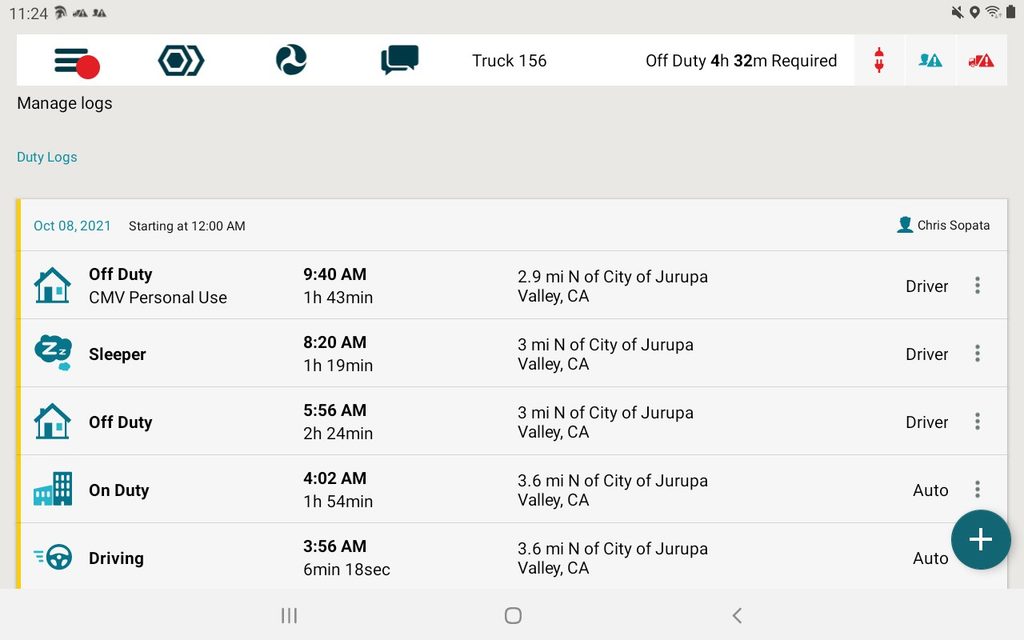
From the Manage Logs page, you can also add a new log.
- From the Manage Logs page, select the plus sign (Bottom Right)
- Add the log that is needed. Required fields include: Annotation, Start Date, State and City.
¿Necesita más ayuda?
Enviar un número
Crear billeteCuestiones generales
support@ftsgps.comLlámenos directamente
1-866-221-1864