Your CSA score affects your fleet’s insurance rates, broker trust, and FMCSA oversight. It’s one of the most important numbers for fleet managers, and one of the most misunderstood.
This guide explains how CSA scores work, how to check them, and practical strategies to lower your percentiles. We also cover the 2025-2026 ELD revocation wave, which is critical for fleets running affected devices.
Table of Contents
1. What Is a CSA Score?
A CSA score (short for Compliance, Safety, Accountability) is a safety measurement used by the Federal Motor Carrier Safety Administration (FMCSA) to identify commercial motor carriers and drivers that pose elevated safety risks.
The program launched in 2010 as a replacement for the older SafeStat system. The goal was straightforward: instead of waiting for a crash to flag a dangerous carrier, FMCSA wanted to catch patterns early, including speeding violations, hours-of-service lapses, maintenance failures, before they became headlines.
Here’s the key thing most people get wrong: your CSA “score” isn’t a score in the traditional sense. You don’t receive a number from 0-100 that gets compared against some universal standard. What you receive is a percentile ranking within seven safety categories, compared only against carriers with a similar number of inspections. A 72 in one BASIC means 72% of comparable carriers are performing better than you in that category, not that you have 72 points.
This distinction matters enormously when it comes to understanding how to improve.
2. The 7 BASIC Categories (And What Each One Measures)
BASIC stands for Behavior Analysis and Safety Improvement Categories. There are seven of them, each tracking a distinct dimension of safety performance.
1. Unsafe Driving
Violations involving how vehicles operate on the road: speeding, reckless driving, improper lane changes, distracted driving, failure to use a seatbelt, following too closely.
Violation point ranges:
Seatbelt violations: 7 points
Speeding (1-10 mph over): 4-7 points
Speeding (11+ mph over): 10 points
Texting/phone use while driving: 10 points
Failure to use turn signal: 5 points
Improper lane change: 5 points
Public visibility: Yes
2. Crash Indicator
Based on crash reports submitted by states to FMCSA. Tracks the frequency and severity of crashes relative to miles traveled.
Public visibility: No (visible only to carriers and enforcement)
3. Hours of Service (HOS) Compliance
Tracks violations related to driver fatigue rules: false logs, exceeding drive time limits, missing logbook entries, ELD non-compliance. Violation point ranges:
False log entry: 7 points
Exceeding 11-hour driving limit: 7 points
No record of duty status (no ELD or paper log): 5-7 points
HOS form/manner violations: 5 points
Public visibility: Yes
4. Vehicle Maintenance
Covers mechanical violations found during roadside inspections: Brakes, tires, lights, cargo securement, exhaust, steering.
Violation point ranges:
Inoperative required lamps: 2-6 points
Brake violations: 4 points
Tire issues (tread depth, flat): 3-8 points
Inoperable required equipment: 2-4 points
Public visibility: Yes
5. Controlled Substances & Alcohol
Violations involving drivers operating under the influence of drugs or alcohol, or testing violations.
Violation point ranges:
Operating under the influence: 10 points
Using alcohol within 4 hours of duty: 5 points
Positive drug test / refusal to test: 10 points
Public visibility: Yes
6. Hazardous Materials Compliance
Violations related to the placarding, packaging, handling, and transportation of hazardous materials. Cargo securement violations also live here for carriers transporting HazMat.
Violation point ranges:
Improper cargo securement: 1-8 points
HazMat placarding violations: 1-10 points
Public visibility: No (visible only to carriers and enforcement)
7. Driver Fitness
Violations involving driver qualifications: expired or missing CDL, invalid medical certificate, driving without proper endorsements.
Violation point ranges:
No valid CDL: 8 points
Expired medical certificate: 1-2 points
CDL language requirement violation: 4 points
Driving without required endorsement: 6 points
Public visibility: Yes
3. How CSA Scores Are Calculated
Understanding the math behind CSA scores helps you prioritize what to fix first.
Step 1: Violations Are Assigned Severity Points (1-10)
Every violation in each BASIC has a pre-assigned severity weight. A seatbelt violation is 7 points. Texting while driving is 10. These severity weights reflect the relative risk of each specific violation within that BASIC; they aren’t comparable across categories.
Step 2: Time-Based Multipliers Are Applied
The FMCSA weights recent violations more heavily than older ones. Here’s how it breaks down:
For carriers:
Violations 1-6 months old: 3x multiplier
Violations 7-12 months old: 2x multiplier
Violations 13-24 months old: 1x multiplier
Violations older than 24 months: drop off entirely
For drivers:
Violations 1-12 months old: 3x multiplier
Violations 13-24 months old: 2x multiplier
Violations 25-36 months old: 1x multiplier
Violations older than 36 months: drop off
This is one of the most important levers available to fleets actively working on improvement. Violations eventually age out, and recent clean inspections actively help your percentile.
Step 3: Single Inspection Cap
The sum of violations from any single inspection is capped at 30 points within a BASIC — before the time multiplier is applied. So, a 30-point inspection in the first six months contributes 90 points to your calculation. This is why one bad inspection can have an outsized impact in the short term.
Step 4: Out-of-Service Adds 2 Extra Points
Any violation that results in an Out-of-Service (OOS) order gets 2 additional severity points tacked on. Avoiding OOS-level violations is especially important.
Step 5: Percentile Ranking Against Peer Group
Your weighted point totals are compared against carriers with a similar number of inspections. The result is a percentile from 0-100 for each BASIC. Lower is better. A carrier at the 10th percentile has fewer violations than 90% of comparable carriers.
Key insight: You can improve your percentile by accumulating clean inspections and by letting old violations age off — even without a single new violation going away.
4. How to Look Up Your CSA Score
The FMCSA makes carrier safety data available through its Safety Measurement System (SMS).
View your public-facing data. This includes your Unsafe Driving, HOS Compliance, Vehicle Maintenance, Controlled Substances, and Driver Fitness BASICs if you have enough data for a percentile to be calculated
Log in to the SMS portal with your FMCSA credentials to access non-public data, including your Crash Indicator and HazMat Compliance percentiles
What You’ll See
Your BASIC percentiles (where calculated)
Inspection and violation history for the past 24 months
Intervention alert flags if you’re above threshold
A summary of roadside inspection results
Important: Not All Carriers Have Percentiles
FMCSA only calculates a BASIC percentile when you have enough inspection data to make a meaningful comparison. Carriers with very few inspections may not have visible percentiles, though that doesn’t mean they’re immune to intervention if violations are serious enough.
Checking Driver Records (PSP)
For driver-level data, use the FMCSA’s Pre-Employment Screening Program (PSP) at psp.fmcsa.dot.gov. Each report costs $10 and shows a driver’s five-year crash history and three-year roadside inspection record. Carriers with up to 99 vehicles pay $25/year for an account; carriers with 100+ vehicles pay $100/year.
5. CSA Score Thresholds: What Triggers FMCSA Intervention
Once your BASIC percentile crosses a predefined threshold, the FMCSA begins taking action. Thresholds vary by BASIC category and by carrier type (general freight, passenger, HazMat).
Intervention Thresholds by BASIC
BASIC Category
General Freight
Passenger Carriers
HazMat Carriers
Unsafe Driving
65%
60%
60%
HOS Compliance
65%
60%
65%
Vehicle Maintenance
80%
80%
80%
Controlled Substances/Alcohol
80%
80%
80%
Driver Fitness
80%
75%
80%
Hazardous Materials Compliance
80%
—
80%
Crash Indicator
65%
60%
65%
Thresholds current as of March 2026 and subject to periodic FMCSA revision. Always confirm current thresholds on the FMCSA SMS website.
What Happens When You Cross a Threshold?
Level 1: Early Contact:
Warning Letters: A formal notice from the FMCSA identifying the BASIC(s) of concern and requesting corrective action
Targeted Roadside Inspections: Your fleet gets flagged for increased scrutiny at weigh stations and checkpoints
Level 2: Investigation:
Offsite Investigation: A Safety Investigator reviews your documentation remotely, including logs, maintenance records, driver files
Onsite Focused Investigation: An investigator visits your facility to examine specific compliance areas
Onsite Comprehensive Investigation: Full audit of your operations across all BASICs
Level 3: Escalated:
Notice of Violation or Claim: Formal enforcement action with civil penalties
Operations Out-of-Service Order (OOSO): The FMCSA can order you to cease operations entirely
The consequences compound: carriers under active FMCSA scrutiny often see higher insurance premiums, lost shipper contracts, and difficulty recruiting qualified drivers.
6. How to Improve Your CSA Score
Improving your CSA score is not one big fix; it’s a discipline. Here are practical actions for each BASIC category.
Unsafe Driving
Coach drivers on high-severity violations first. Speeding 11+ mph over and cell phone use both hit 10 points. These are the violations that move your percentile fastest.
Use real-time GPS tracking to monitor speeding, harsh braking, and aggressive acceleration. When drivers know behavior is visible, it changes. IntelliHub gives fleet managers live visibility into driver behavior across the entire fleet, not just when someone files a complaint.
Leverage driver coaching tools to intervene before violations happen. DriveShield uses automated alerts and structured coaching workflows to address risky behaviors proactively, rather than reactively after a roadside citation.
Screen new hires using PSP reports. A driver with five speeding citations in the past three years will carry that history into your BASIC percentile from day one.
HOS Compliance
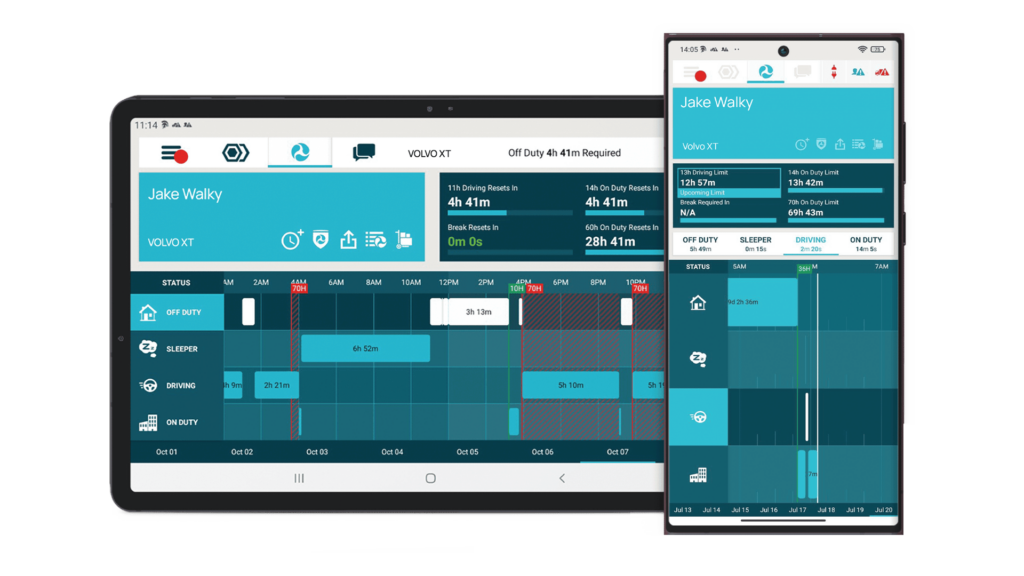
ELDs are your first line of defense. Manual logs are where HOS violations happen, such as missing entries, falsified records, and form-and-manner errors. A properly functioning ELD eliminates most of these automatically. Field Warrior is FMCSA-registered, available as a BYOD option for fleets that don’t want dedicated hardware, and integrates directly with dispatch and dispatch workflows.
Train dispatchers, not just drivers. Over 30% of HOS violations involve dispatchers pressuring drivers to exceed legal limits or failing to account for driving time when assigning loads. Compliance is a dispatch problem as much as a driver problem.
Keep ELD mounting consistent across vehicles. An ELD that’s not readily accessible for inspection can generate its own paperwork violation.
Establish fatigue policies and stick to them. Driving while fatigued carries 10 points and creates genuine crash risk.
See driver Hours of Service at a glance. Field Warrior ELD keeps logs accurate, accessible, and FMCSA-compliant.
Vehicle Maintenance
Pre-trip and post-trip DVIRs are non-negotiable. Per FMCSA Vehicle Maintenance BASIC data, lights (~20% of violations), brakes (~20%), and tires (~9%) are the top three sources of vehicle maintenance violations, and all three are visible and preventable with thorough inspections.
According to FMCSA enforcement data, approximately 31% of roadside inspections are triggered by a visible defect the officer spotted before they even approached the cab. A clean, well-maintained vehicle reduces the probability of being pulled in at all.
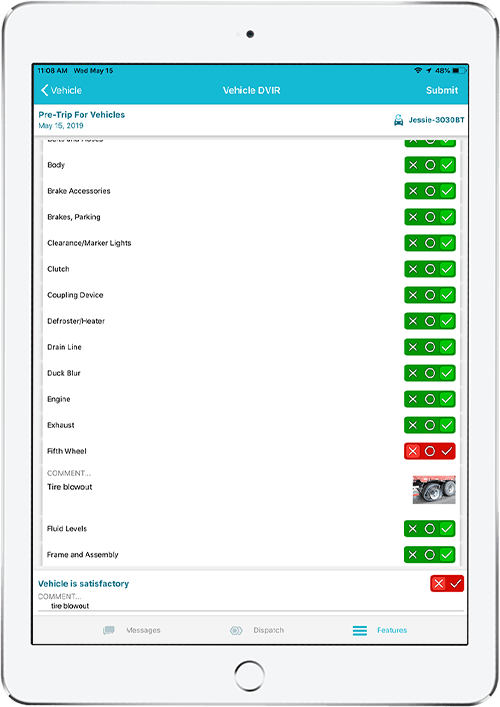
Use electronic DVIRs rather than paper. Digital forms guide drivers through every checkpoint and create a timestamped record of completion, which matters enormously if you ever challenge a violation.
Track preventative maintenance schedules proactively. IntelliHub’s fleet management platform includes maintenance scheduling and alert workflows to keep vehicles out of violation territory.
Crash Indicator
Understand the Crash Preventability Demonstration Program (CPDP). Since 2017, the FMCSA has operated a program allowing carriers to request review of crashes where their driver was not at fault (e.g., rear-ended while stopped, struck by wrong-way driver). If a crash is determined “not preventable” under CPDP, it’s excluded from your Crash Indicator BASIC percentile calculation. Submit eligible crashes through the DataQs portal. The CPDP review is separate from a standard RDR.
Dashcams are the most underutilized tool in crash dispute resolution. When a crash is reported to FMCSA, it goes into your Crash Indicator BASIC, regardless of fault. The only way to have an at-fault crash removed is through the DataQs process (covered in the next section), and video evidence is your most powerful argument.
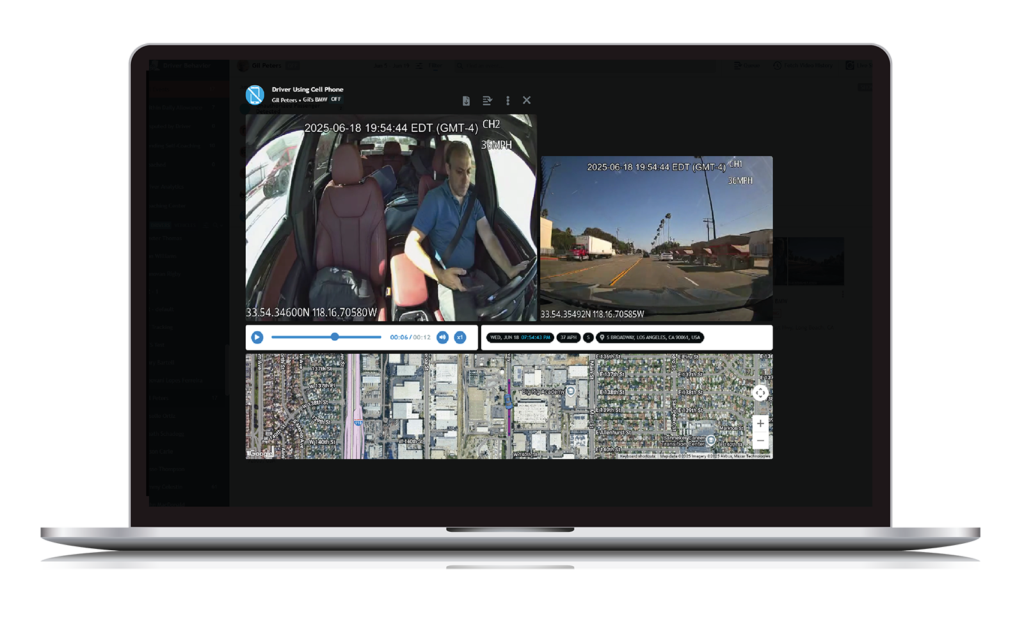
FleetCam captures dual-view video during incidents, giving you timestamped footage that clearly shows road conditions, the other driver’s behavior, and your driver’s actions. Without video, disputing a crash is an uphill battle. With it, valid disputes become winnable.
Review near-miss incidents proactively. FleetCam’s AI detection can flag harsh events even when no crash report is filed, giving you coaching data before a pattern becomes a BASIC problem.
Dual-view dashcam footage lets you see every moment as FleetCam captures driver actions, road conditions, and incidents for clear, timestamped evidence.
Controlled Substances & Alcohol
This BASIC has an 80% intervention threshold, but the violations are severe (10 points each) and almost impossible to dispute.
Institute a written zero-tolerance policy. Make it part of the driver handbook and orientation.
Train supervisors to recognize impairment and document what they observe. The documentation matters if a situation ever escalates.
Never skip pre-employment drug testing, and ensure your random testing program meets DOT minimums.
Driver Fitness
Audit driver files at least annually. Expired CDLs and medical certificates are entirely preventable with a tickler system.
Set calendar reminders for DOT physical renewals 90 days in advance. Many violations happen because a driver’s certificate quietly expired between annual reviews.
Drivers must always carry their CDL and current medical examiner’s certificate while operating a CMV.
Ensure drivers requiring endorsements (Hazmat, tanker, passenger) have current, valid endorsements before assigning applicable loads.
Hazardous Materials Compliance
Cargo securement violations are common and preventable. Ensure drivers understand how to properly strap, chain, and edge-protect loads before departure.
Verify proper placarding before every HazMat load leaves the yard. Placarding errors are a top source of HazMat BASIC violations.
Drivers must always stop completely at all required railroad crossings.
7. How to Challenge a CSA Violation (The DataQs Process)
CSA data isn’t always accurate. Officers make errors. Crashes get misclassified. The FMCSA provides a formal mechanism to dispute incorrect or incomplete information: DataQs.
What You Can Challenge
Incorrect or incomplete roadside inspection reports
Crashes recorded as preventable when they weren’t your driver’s fault
Duplicate records
Incorrect carrier/driver assignment on a violation
Create an account or log in with your existing FMCSA credentials
Submit a Request for Data Review (RDR). Select the specific inspection or crash record you’re challenging
Provide supporting documentation. The inspection report, your maintenance records, dashcam footage, driver logs, or any evidence that the record is inaccurate
The state agency that submitted the original record reviews your challenge and makes a determination
FMCSA updates the SMS data if the challenge is upheld
Tips for Successful DataQs Challenges
Act quickly. There’s no hard deadline but challenging a recent inspection is far easier than disputing one two years old. Most DataQs challenges are processed within 30-45 days, though delays are possible depending on the reviewing state agency.
Video evidence wins. If a dashcam captured the incident, submit the footage. It dramatically increases your success rate in crash disputes.
Be specific. Vague challenges rarely succeed. Identify the exact error in the report and provide specific documentation contradicting it.
If a crash is determined not preventable by your driver, submit a crash challenge. Crashes that are successfully disputed can be removed from the Crash Indicator BASIC.
8. 2025-2026 Updates: ELD Revocations and Your CSA Score
This is the section many fleet managers need to read right now.
What’s Happening
Starting in November 2025, the FMCSA launched an unprecedented enforcement wave against non-compliant ELD providers. Across multiple rounds of revocations, including November 2025, December 2025, January 2026, and February 2026, the agency has removed more than 25 ELD devices from its registered devices list.
The revoked devices span a wide range of providers:
November 2025 wave: Ontime Logs PT, Green Light ELD, Sahara ELD, USFAST ELD, ELDWISE
December 8, 2025 wave: PSS ELD (Pioneer Safety Solutions), Black Bear ELD, RT ELD Plus (Rollingtrans)
December 30, 2025 wave: P3TS, Field Warrior ELD BYOD, Field Warrior ELD Garmin, DYNAMIC ELD
January 13, 2026 wave: PREMIERRIDE LOGS, DSGELOGS, STATE ELOGS, STATE ELOGS 2
Under FMCSA rules, using a revoked ELD is treated the same as operating with no ELD at all. After each 60-day transition window closes, drivers found using a revoked device are cited under:
395.8(a)(1) — No record of duty status (5-7 points)
395.22(a) — Failure to use a registered ELD (5-7 points)
A driver who gets cited at multiple inspections before the carrier realizes their ELD has been revoked can accumulate enough HOS violations to push the fleet’s percentile above the 65% intervention threshold in a matter of weeks. It compounds fast.
What Happened with Field Warrior
Forward Thinking Systems’ Field Warrior ELD was included in the December 30, 2025 revocation. Two variants were removed: the BYOD version and the Garmin-based version. FTS immediately began working with FMCSA to address the identified compliance issues.
On February 25, 2026, the Field Warrior ELD (BYOD) was officially reinstated to the FMCSA registered devices list (ELD Identifier FTSFW1, Model Number FW-BYOD). Carriers using Field Warrior can now operate fully compliantly.
This situation illustrates a reality every fleet manager should internalize: ELD compliance is not a set-it-and-forget-it problem. Providers get revoked. Technical requirements evolve. The FMCSA enforces, and the carriers bear the cost.
How to Protect Your Fleet Going Forward
Verify your ELD is still on the registered list. Check eld.fmcsa.dot.gov/List periodically, not just when you onboard a new device.
Subscribe to FMCSA email alerts so you’re notified of revocations before they hit enforcement deadlines.
Document your compliance. If your ELD is revoked and you’re in the transition window, keep detailed paper logs and note the transition in your records.
Choose providers who respond quickly. FTS corrected Field Warrior’s issues and achieved reinstatement within weeks. That responsiveness matters.
If you’re currently running a revoked ELD, or you’re not sure, then check the list today. The 60-day clock starts from the revocation date, not from when you find out. Visit the FTS ELD Resource Center for up-to-date information on Field Warrior’s registration status and compliance guidance.
9. Frequently Asked Questions
What is a CSA score?
A CSA score (Compliance, Safety, Accountability score) is a percentile ranking assigned by the FMCSA to commercial motor carriers within seven safety categories called BASICs. It reflects how your fleet’s safety performance compares to other carriers with a similar inspection history. Lower percentiles are better. The FMCSA uses CSA scores to prioritize which carriers to investigate or intervene with.
How do I look up my CSA score?
You can look up your carrier’s public CSA data at the FMCSA Safety Measurement System (SMS): https://ai.fmcsa.dot.gov/SMS. Enter your DOT number or carrier name to view your BASIC percentiles, inspection history, and any intervention alerts. Some BASICs (Crash Indicator and HazMat Compliance) are only visible to carriers and law enforcement; you’ll need to log in with your FMCSA credentials to see those.
What CSA score triggers FMCSA intervention?
The threshold varies by BASIC category and carrier type. For general freight carriers, the Unsafe Driving and HOS Compliance BASICs trigger intervention at 65%. The Vehicle Maintenance, Controlled Substances, and Driver Fitness BASICs trigger at 80%. Passenger carriers have lower thresholds across most categories. Crossing a threshold doesn’t guarantee immediate action, but it places your fleet on FMCSA’s radar for warning letters, targeted inspections, and possible investigation.
How long do CSA violations stay on my record?
For carriers, violations stay on your record for 24 months from the date of the inspection. For drivers, violations remain for 36 months. Recent violations carry more weight: violations in the past 6 months are multiplied by 3x; violations 7-12 months old are multiplied by 2x; violations 13-24 months old count at face value. This means that time, combined with clean inspections, naturally improves your percentile.
Can I challenge a CSA violation?
Yes. If you believe an inspection report contains errors, such as wrong carrier assignment, inaccurate violation description, a crash that wasn’t your driver’s fault, you can submit a Request for Data Review through FMCSA’s DataQs system at dataqs.fmcsa.dot.gov. Supporting documentation, especially dashcam footage, significantly improves your chances of a successful challenge.
Does using a revoked ELD hurt my CSA score?
Yes, significantly. Once the 60-day compliance window closes after a revocation, drivers using revoked ELDs are cited as operating without an ELD — a 395.8(a)(1) violation that scores 5-7 points in the HOS Compliance BASIC. Multiple drivers getting cited across multiple inspections can rapidly push your HOS percentile above the 65% intervention threshold. Always verify your ELD’s current status on the FMCSA registered devices list.
How often is my CSA score updated?
The FMCSA updates SMS data monthly, typically during the first week of each month. New inspections, violations, and crash reports may appear with a slight delay as state agencies submit their data. Set a calendar reminder to review your SMS profile each month so you catch changes early.
Do CSA scores affect my insurance rates?
Yes. Insurance underwriters routinely check CSA/SMS data when quoting or renewing commercial auto policies. High percentiles in safety-critical BASICs like Unsafe Driving, Crash Indicator, and Vehicle Maintenance can result in higher premiums or difficulty obtaining coverage. Brokers and shippers also use CSA data to vet carriers before awarding freight. A poor safety profile costs your business beyond just insurance.
What’s the difference between a CSA score and a Safety Rating?
These are two distinct systems. A CSA score is a percentile ranking within seven BASIC categories, updated monthly based on inspections and crash reports. It’s the proactive, early-warning system. A FMCSA Safety Rating (Satisfactory, Conditional, or Unsatisfactory) is assigned after a formal compliance review and reflects a broader assessment of your safety management systems. A poor CSA score often triggers the investigation that leads to a Conditional or Unsatisfactory rating, but the two exist on separate tracks.
Field Warrior makes pre- and post-trip vehicle inspections simple, helping drivers log every detail and keep your fleet inspection-ready.
Summary: The Three Levers That Move Your CSA Score
If you take one thing from this guide, make it this: CSA improvement is systematic, not reactive.
The three most impactful things you can do, in order of leverage:
Eliminate high-severity violations before inspections happen. Speeding, distracted driving, ELD non-compliance, and brake/light failures account for the bulk of most fleets’ point load. Real-time GPS monitoring, driver coaching, and proper ELD compliance address these at the root.
Accumulate clean inspections . Every clean inspection improves your percentile ranking. Participate in the CVSA’s Roadcheck events. Use pre-trip DVIRs religiously. Train drivers to present well at inspections.
Dispute what’s wrong. Incorrect records don’t fix themselves. If a crash wasn’t your driver’s fault, challenge it with dashcam footage through DataQs. If a violation was issued in error, request a review. Clean data is as important as clean operations.
Fleet management technology won’t fix a culture problem, but it makes every one of these levers easier to pull. IntelliHub handles real-time visibility and maintenance scheduling. Field Warrior keeps HOS compliance airtight. FleetCam creates the video record you need when crashes happen. DriveShield closes the loop on driver behavior before it becomes a citation.
The goal isn’t zero violations; it’s continuous, measurable improvement. That’s what good CSA scores reflect, and that’s what keeps your fleet on the road.
For the latest on ELD compliance requirements and the FMCSA registered devices list, visit the FTS ELD Resource Center.