





FleetCam Signal Strength Indicator
What’s New
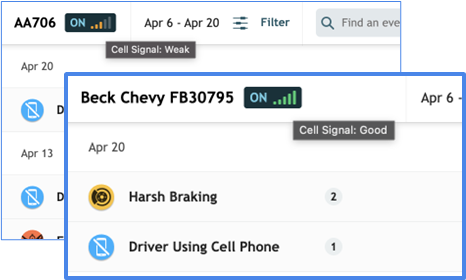
The camera status badge now shows how each FleetCam camera is connected to the server, with a visual quality indicator for cellular signal. This lets you gauge connection reliability before attempting to live stream or download video — if a camera is in an area with poor cellular coverage, you’ll see it at a glance and know to expect slower or less reliable transmission.
How It Works
The signal indicator appears next to the camera status badge wherever the badge is displayed in FleetCam Dashboard, including:
- The Main Events list when a vehicle is selected
- The event video player
- The Fetch Video History screen
Three indicator types display based on each camera’s connection method:
- Cellular — A 5-bar signal meter, color-coded by signal quality.
- Wi-Fi — A green Wi-Fi icon. Tooltip: Connected via Wi-Fi
- Ethernet — A green wired-network icon. Tooltip: Connected via Ethernet
| Bars | Color | Tooltip |
|---|---|---|
| 1-2 | Red | Cell Signal: Poor |
| 3 | Amber | Cell Signal: Weak |
| 4-5 | Green | Cell Signal: Good |
The signal indicator updates every 30 seconds. It only displays when the camera is ON — if the camera is off or in Sleep Mode, the camera status badge continues to show the camera’s state but the signal indicator is not visible.
Need more help?