





Share Vehicle Location with History
What’s New
When you share a vehicle’s location from IntelliHub, you can now include its recent travel history. The person who opens the link sees the vehicle’s live position plus the route it drove, one day at a time, for as far back as you allow. Links created without history work as before.
How It Works
Creating the link in IntelliHub
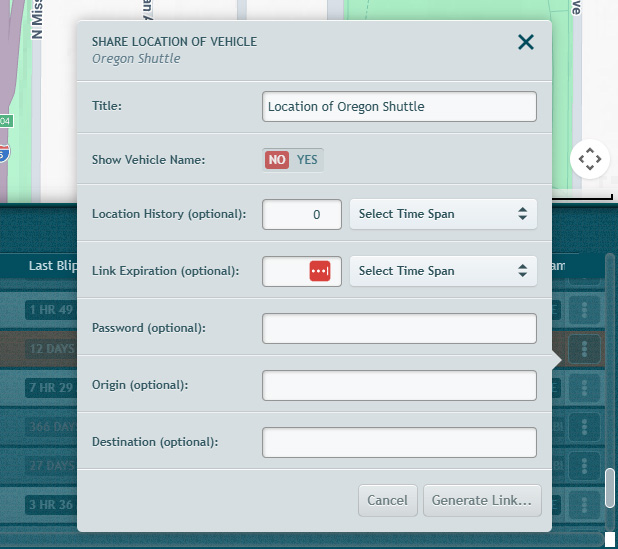
- On the Main Vehicles List, open the vehicle’s options menu and click Share Location….
- In Location History (optional), enter a quantity and choose Minutes, Hours, Days, or Weeks. This is the furthest back the viewer can see. Leave it at 0 for a live-position-only link.
- Set any other options: Show Vehicle Name, Link Expiration, Password, Origin, Destination.
- Click Generate Link…, then Copy to Clipboard or Open in New Tab.
Viewing the link in LiveTracker:
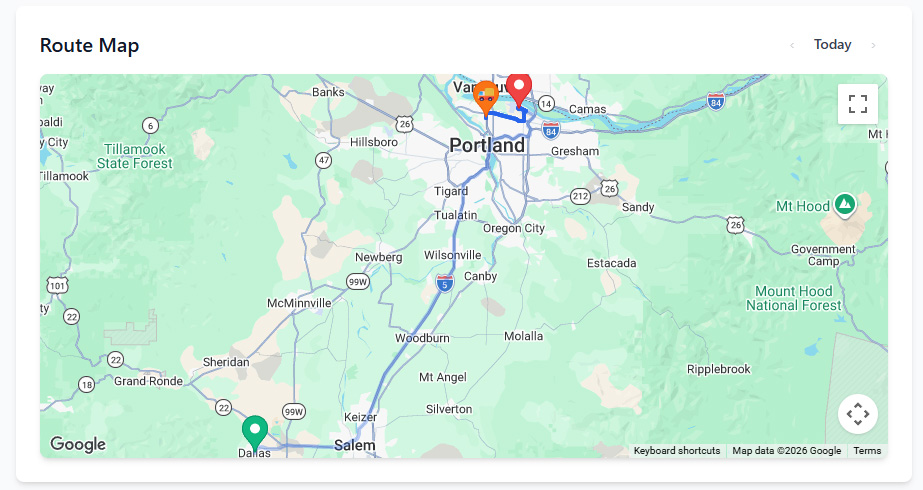
- The page opens on today. The route the vehicle has driven so far is drawn from its actual GPS points and extends as the vehicle moves.
- Use the ‹ and › controls above the map to step back or forward one day. You can go back only as far as the history allowance on the link.
- Past days show a Started marker where the vehicle began the day and a Finished marker where it ended. Click either marker for the time, shown in the vehicle’s local time zone with its GMT offset.
- Days are split at midnight in the vehicle’s local time zone.
What Changed
- Show Vehicle Name is a new option in the share dialog. It defaults to No. The vehicle name appears on the LiveTracker page only when you set it to Yes.
- Link Expiration now takes a duration (quantity plus Minutes, Hours, Days, or Weeks) instead of a date. The link stops working when that time has passed.
- Route lines on the LiveTracker page are now drawn from the vehicle’s recorded GPS positions. Previously they were estimated.
Requirements
- The Share Location… option appears only for users whose account has location sharing enabled. Contact your service provider to turn it on.
- History is available only on links created with a Location History value. Links created before this release show live position only.
Need more help?