




Driver License and Medical Card Expiration Alerts
What’s New
IntelliHub now warns you before a driver’s license or DOT medical card expires. Two new alert types, Driver License Expiration and Medical Card Expiration, send an email or text a set number of days before the expiration date on the driver’s record, so credentials get renewed before they lapse.
How It Works
- Navigate to Settings > Alerts & Notifications and find the Driver License Expiration or Medical Card Expiration alert.
- Click New Alert and name the alert.
- Enter the number of days before expiration you want to be warned.
- Choose the drivers or driver groups the alert covers.
- Add recipients: email addresses, phone numbers for text messages, or portal users.
- Click Save Changes.
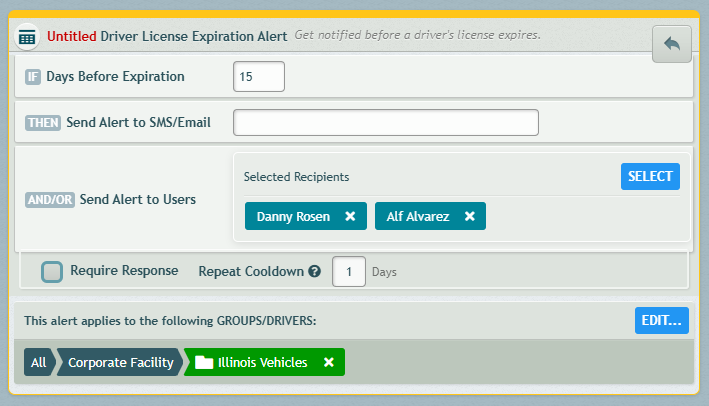
The system checks driver records once a day. When a driver’s license or medical card falls within the warning window, each recipient gets a notification naming the driver and the expiration date.
Requirements
- Expiration dates must be entered on the driver’s profile in Settings > Drivers. A driver with no license or medical card date on file will not trigger these alerts.
- Notifications are available in English, French, and Spanish, following each recipient’s language setting.
Need more help?