





Access External Resources from IntelliHub
What’s New
IntelliHub now has a Resources dropdown in the top navigation. Resources are external links — partner-provided dashboards, portals, or web tools — that open from inside IntelliHub. Each Resource opens in a new browser tab when clicked.
The dropdown only appears when your service provider has configured Resources for your account. If no Resources are set up, the Resources menu is hidden.
How It Works
- Look for Resources in the top navigation bar.
- Click Resources to open the dropdown.
- Click any item in the list. The destination opens in a new browser tab.
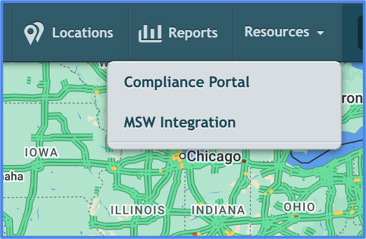
Each item is labeled with the name your service provider chose for it. Hover over an item to see the link target in your browser’s status bar.
Requirements
- Your service provider must add at least one Resource to your account before the dropdown appears.
- You authenticate to each destination separately. IntelliHub does not pass credentials to external sites.
How to Set Up in Engage
Resources are configured per account in Engage. The new Resources tab on the account settings screen is where you add, edit, and remove the links that appear in a customer’s IntelliHub Resources dropdown.
Each Resource has a Name and a URL. The Name is what end users see in IntelliHub. The URL is where they go when they click it.
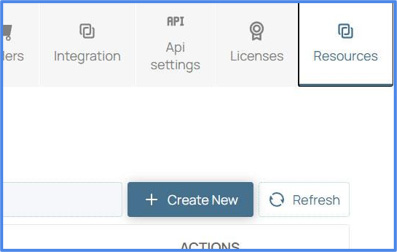
Adding a Resource
- Navigate to Accounts and select the account you want to configure.
- Click the Resources tab.
- Click Add Resource.
- Enter a Name and a URL. The URL must begin with http:// or https://.
- Click Save. The Resource is now available in the IntelliHub Resources dropdown for users on this account.
Editing or Removing a Resource
- Click the edit icon on a row to change its Name or URL.
- Click the delete icon to remove it. Confirm when prompted.
Changes take effect for IntelliHub users the next time they reload IntelliHub
Requirements
- You need the External Resources permission in Engage to create, edit, or delete Resources.
- An Engage admin can grant this permission to other Engage users from the user permissions screen.
- No additional permission is required on the IntelliHub side. Once Resources are configured for an account, every user on that account sees the dropdown.
Need more help?