





IntelliHub Fuel Level Column
What’s New
The Main Vehicles List now includes a Fuel Level column that displays each vehicle’s current fuel quantity alongside its total tank capacity (e.g., 5.6 / 25 GAL.).
The volume unit (gallons or liters) reflects your preference set in user settings.
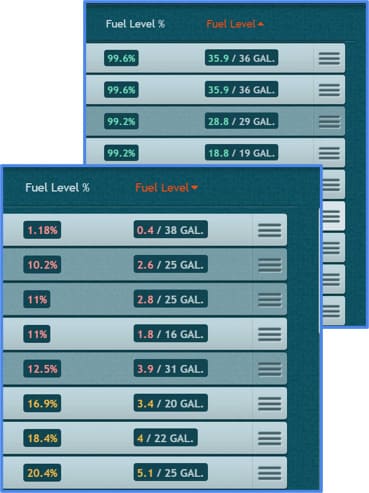
Color Indicators
The fuel level badge is color-coded based on the vehicle’s fuel percentage:
- Red — 15% or below
- Yellow — 16-29%
- Green — 30% or above
Sorting
Click the Fuel Level column header to sort the list. This brings vehicles with the lowest fuel levels to the top, helping you prioritize refueling.
Requirements
The fuel level column needs two pieces of data to display a value:
- The vehicle must report fuel level (%) via its ECU.
- The vehicle must have a tank capacity value in vehicle settings. For many vehicles, this is auto-populated based on a VIN lookup. If no value is found, you can enter the tank capacity manually.
If either value is unavailable, the column displays N/A.
Need more help?