





IntelliHub Tire Pressure Monitoring
What’s New
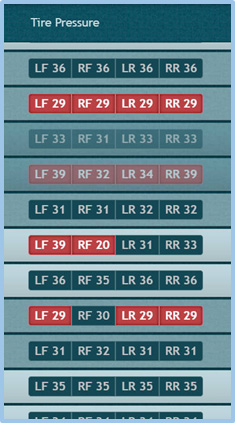
The vehicles list now includes a Tire Pressure column that shows real-time tire pressure data from compatible vehicles. The Tire Pressure column displays current PSI readings for all four tires with visual warnings for potential issues.
How It Works
The indicator displays current PSI for each tire position:
- LF (Left Front)
- RF (Right Front)
- LR (Left Rear)
- RR (Right Rear)
Red highlighting indicates potential issues:
- Tires on the same axle with mismatched pressure
- Any tire with pressure outside safe operating range
Adding the Column
The Tire Pressure column is available but not visible by default. To add it to your vehicle list:
- Click the filter icon near the search box
- Select Tire Pressure from the field chooser
- The column appears in your vehicle list
Requirements
Tire pressure data displays for vehicles equipped with:
- Tire Pressure Monitoring System (TPMS) in the vehicle ECU
- Compatible tracking device that supports ECU data readings
Vehicles without compatible equipment show no data in this column.
Data Updates
The Tire Pressure column refreshes automatically with your vehicle list data.
Need more help?