





Vehicle Stopped Alert
What’s New
A new alert notifies you when a vehicle stays stopped longer than a set number of minutes. Apply it fleet-wide, or limit it to specific locations so you’re only alerted where an extended stop matters.
How It Works
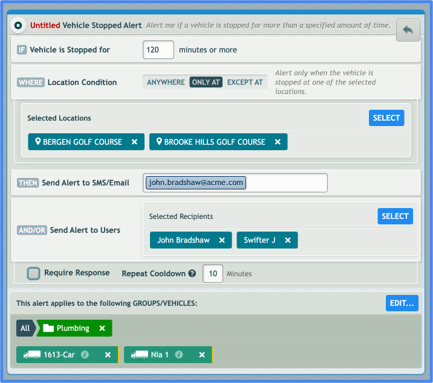
Create the alert in Settings > Alerts & Notifications. Open Vehicle Stopped and set:
- Minutes stopped: how long a vehicle must stay stopped before the alert fires.
- Where it applies:
- Anywhere: Fires regardless of location.
- Only At: fires only at the locations you select.
- Except At: fires everywhere except the locations you select.
- Locations (for Only At or Except At): open the picker to browse your location groups. Add a whole group, or add individual locations from any group, in any combination.
- Recipients: notify SMS or email recipients and IntelliHub users, with the standard Require Response and Show in Fleet Monitor options.
If an alert includes a location saved privately by another user, that location is locked and can’t be removed while you edit. Its name shows if you have permission to see it; otherwise it appears as Private Location.
Requirements
- Available in Settings > Alerts & Notifications to users who can create alerts.
- The Only At and Except At conditions require at least one saved location.
Need more help?