





Vehicle Control History: New Command Log for Your Vehicles
What’s New
Vehicle Control History is a new log that shows every command sent to your vehicles, who sent it, and whether the device carried it out.
Until now a command’s status disappeared as soon as you closed the Vehicle Control panel. The history keeps a searchable record you can open at any time, either for one vehicle or for your whole fleet.
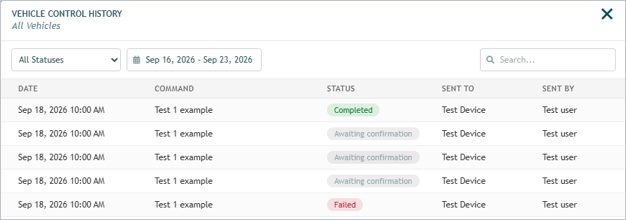
- Full command log. Every command is listed with its date and time, command name, current status, the vehicle it was sent to, and the user who sent it.
- Two ways in. Open the history for a single vehicle from its Vehicle Control panel, or open it for all vehicles from the Resources menu in the top navigation.
- Date range filter. Pick any range up to 31 days. Future dates are locked out.
- Status filter. Narrow the list to Sending, Sent to device, Awaiting confirmation, Completed, or Failed.
- Search. Type to filter the loaded results by command, vehicle, user, or status. Results update as you type.
- Long lists stay fast. Rows load in batches of 50 as you scroll.
How It Works
Opening the history for one vehicle
- In the vehicles list, open the context menu for the vehicle and hover Vehicle Control.
- Click Show History at the bottom of the command flyout. On the Full Activity screen the same button appears under the command list as Show history.
- The window opens titled Vehicle Control History with the vehicle name as its subtitle, pre-filled with the last 7 days.
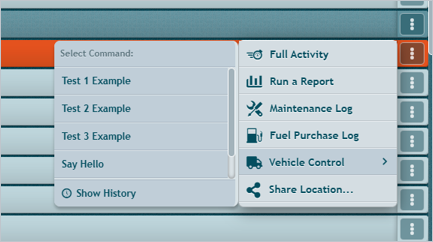
Other option:
- Open Full activity view of a vehicle
- Open at Send Device Command menu
- Click at Show history button
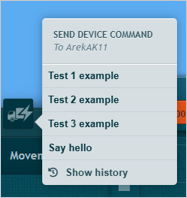
Opening the history for all vehicles
- Click Resources in the top navigation.
- Choose Vehicle Control History.
- The window opens with All Vehicles as its subtitle, covering every vehicle you have access to.

Filtering and reading the list
Rows are sorted newest first. Use the status dropdown and the date field on the left to change what is fetched, and the search box on the right to filter what is already on screen.
Statuses you will see:
| Status | Meaning |
|---|---|
| Sending | The command has been accepted and is on its way to the device. |
| Sent to device | The device has received the command. |
| Awaiting confirmation | The device is expected to confirm execution. |
| Completed | The device confirmed the command was carried out. |
| Failed | The command did not complete. |
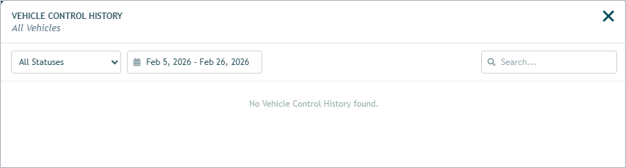
If nothing matches, the window says No results found. If there is simply no history yet, it says No Vehicle Control History for this vehicle or No Vehicle Control History found.
What Changed
Nothing about sending commands has changed. The additions are:
- Vehicle Control flyout now ends with a Show History button.
- Send command window on Full Activity now has a Show history button under the command list.
- Resources menu now lists Vehicle Control History as its first entry. The menu appears even if no other resources are configured for your account.
- Default date range is the last 7 days when the window opens.
- Closing the history window returns you to the Vehicle Control flyout instead of dismissing it.
Requirements
- Vehicle Actions permission. The Vehicle Control History entry in the Resources menu is shown only to users who have the Vehicle Actions permission. Ask your administrator if you do not see it.
- A command-capable device. Per-vehicle history is reachable through Vehicle Control, which appears only on vehicles whose device supports commands.
- Fleet-wide view is scoped to you. The all-vehicles history returns only the vehicles in your account.
- No setup needed. The feature is available as soon as the release is deployed; there is nothing to enable.
Need more help?